
Primary focus
Innovative Designer
Builds a first playable version, tests it, then iterates its rules, artwork and signature feature.
Training intensity 4/5Major focus
Practised in 4 of 8 workshop stages
A 90-minute workshop where your kid directs an AI to build a real, playable rhythm game — heroes battling to the beat. Their hero, their world, their music, their look. No coding needed: the AI writes the code and draws the art while your kid makes every creative call. It ends with a showcase circle and a public link — a finished game they can share before they even leave the room.
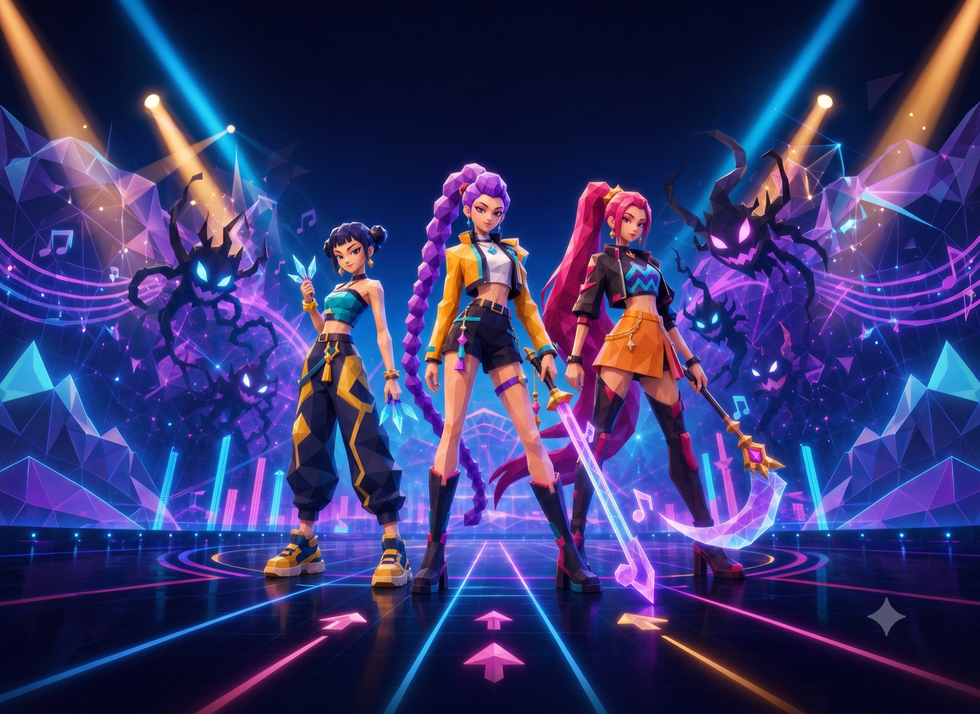
A short example of the kind of playable AI rhythm game kids build, test and share in the workshop.
Local backend is not reachable, so class times cannot be loaded.
This is a hands-on, in-person workshop and each kid builds on their own device — so please pack these before you come:
Fully charged, with a modern browser (Chrome or Edge). A tablet of at least 9.7" works too — everything runs in the browser, nothing to install.
It is 90 minutes of non-stop building — bring the charger so a low battery never cuts the session short.
Kids drag, aim and fine-tune the game constantly — a mouse (or a laptop trackpad) is far easier than a bare touchscreen.
It is a rhythm game — headphones let each kid hear their own beat and test the timing without the room turning noisy.
In 90 minutes your kid directs an AI to build a real, playable game — start to finish. Three skills, one session:
Direct an AI to write the game’s code from plain-English prompts — then read it and change it to make the game theirs.
The heart of every rhythm game: beat timing, hit windows, combos and scoring — tuned until it feels right.
Publish to a public link the same day — a game the kid can send to family and friends.
Each capability is tied to something children actually do in the course. The lesson markers below show where that practice happens.
Training intensity describes how strongly and how often the course deliberately practises a capability. It is not a score for your child.
Builds a first playable version, tests it, then iterates its rules, artwork and signature feature.
Practised in 4 of 8 workshop stages
Adjusts beat timing, hit windows, combo logic and scoring, checking each automated change.
Practised in 3 of 8 workshop stages
Art-directs an original hero and stage, publishes the game and presents it to the class.
Practised in 4 of 8 workshop stages
Moves from a guided first prompt to hunting bugs and adding an independent feature.
Practised in 4 of 8 workshop stages
Plays classmates’ games, exchanges ideas and uses the showcase circle as peer feedback.
Practised in 1 of 8 workshop stages
One 90-minute workshop, broken into clear AI-making checkpoints — prompt, generate, remix, test, battle and share.
Meet the mission for the day, the ground rules, and get the studio booted. Everyone starts at the same line, ready to build.
AI in this step: Meet your AI build partner — the one you’ll be directing for the next 90 minutes.
Your studio open, set up, and ready to go.
Type your first prompt and watch a playable rhythm game appear on screen. Take it for a first test-play within minutes.
AI in this step: One prompt turns into a working game — you read what it made and press play.
A playable first version of your game — already yours.
The single most useful skill of the day: how to ask the AI for exactly what you want, and what to say when it’s not quite right.
AI in this step: Practise prompting like a director — clear asks, quick fixes, better results.
The knack for getting the AI to build what’s in your head.
Tune the beat, the timing, the hits and the score until the game feels great to play. A coach circles the room to help over the tricky bits.
AI in this step: You direct the AI to change the rules — note speed, hit windows, scoring — and test each tweak.
A game that feels fair, fast and fun to play.
Design your hero, the enemies, the effects and the stage in your own style. You art-direct; the AI draws. A coach is on hand as you go.
AI in this step: Describe your game’s world and the AI generates the art to match.
Your own hero and stage — your game, your look.
Take the controls: play your game, hunt down bugs yourself, and add your own signature move or secret feature.
AI in this step: Debug and add features with the AI as your pair — you decide what goes in.
A polished game with a feature only yours has.
Everyone gathers round and plays each other’s games. Cheer the best moves, swap ideas, and see how differently each build turned out.
AI in this step: Step back from the AI — this part is all you and your crew.
The room playing your game — and you playing theirs.
Publish your game and grab your own share link to send to family and friends. Your creation goes live the same day.
AI in this step: The AI helps package and publish your game to a public link.
A share link to your finished game — live and ready to send.
In-person. 10 kids per group. One 90-minute workshop — perfect as a taster, a party, or a school-holiday drop-in.
Built in the Airbotix browser studio (nothing to install, kid-safe). Code and art via our DeepRouter gateway with kid-safe defaults. The finished game deploys to a public link.
One 90-minute workshop
Free 15-min consult first · refundable if the cohort doesn’t fill.
Yes. This is a face-to-face 90-minute workshop, with the teacher working around the room.
No. We guide them from the first idea to a working game. They make the decisions, test the result and ask for changes when something is not right.
Yes. They choose the character, setting, colours and overall feel. We help them make original artwork instead of copying an existing game or film.
Yes. The project is deliberately small enough to complete in one workshop, and they leave with a playable link they can show at home.
A laptop or tablet with a modern browser. Tablets should be at least 9.7 inches so the game studio has enough room. Everything runs in the Airbotix browser studio — nothing to install.
Loved it? This is the on-ramp to Game Studio’s multi-week courses, where kids build bigger games on the same tools — like Build a Music Game with Your Own Song and Build a Super Mario Game with AI.
Book a free 15-min consult — we’ll check it’s the right fit and tell you when the next cohort starts.
Reserve a Seat